
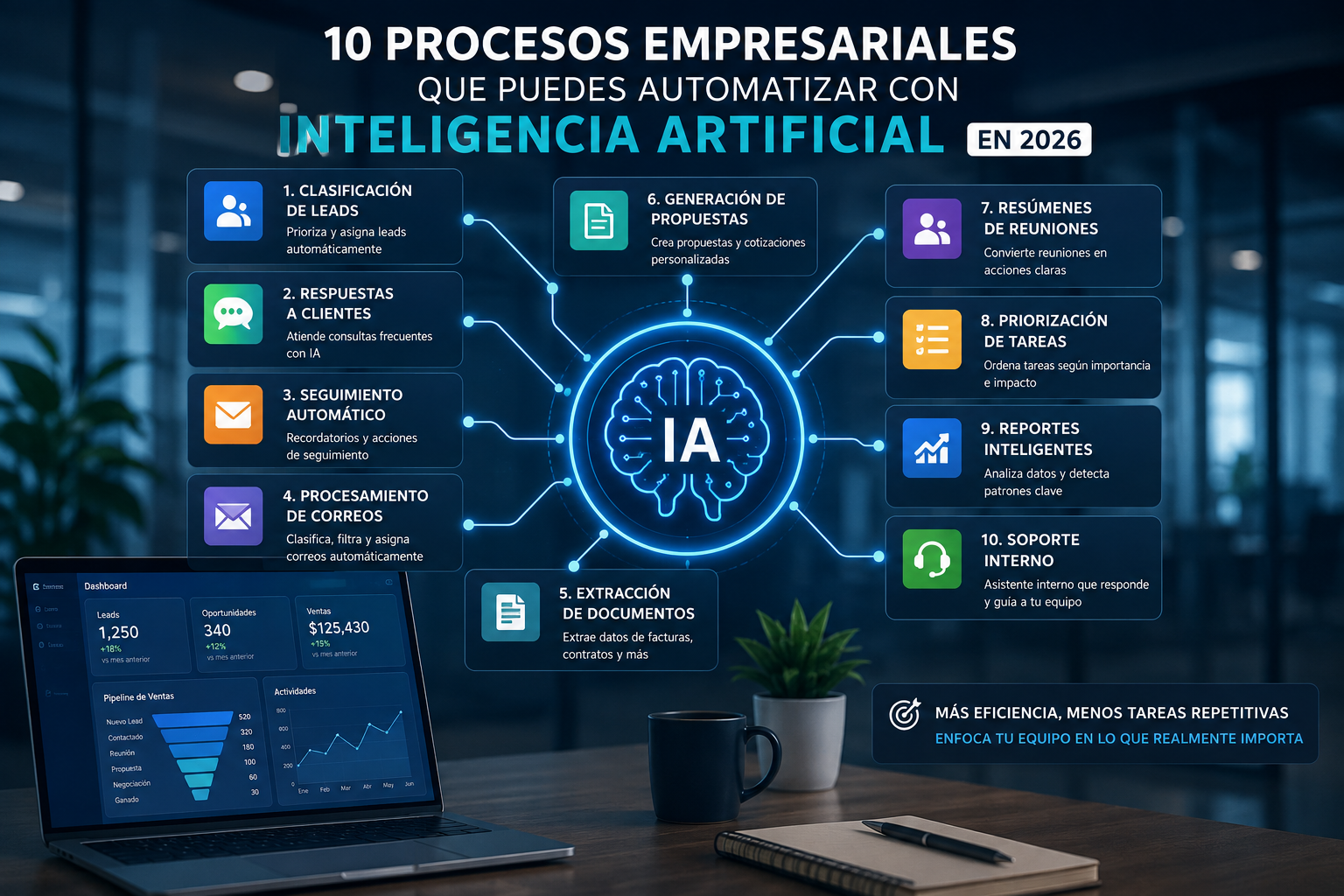
10 Business Processes You Can Automate with Artificial Intelligence in 2026
Artificial intelligence can automate repetitive tasks, reduce errors, and free up valuable team time. Discover 10 business processes you can automate to improve productivity and efficiency.
Artificial intelligence is no longer simply an experimental technology used by large technology companies.
Businesses of different sizes are increasingly using AI to automate administrative tasks, improve customer service, organize information, analyze data, and accelerate internal processes.
However, there is an important difference between using artificial intelligence and actually automating a business process.
Opening an AI application and asking a question may save a few minutes.
Integrating artificial intelligence directly into a workflow can potentially save hundreds of hours over time.
The real opportunity appears when AI connects with the systems a company already uses: CRM platforms, email, website forms, databases, WhatsApp, calendars, administrative systems, and internal applications.
Here are 10 business processes that companies can automate with artificial intelligence.
1. Automatic lead classification
When a company receives many prospects, not every lead has the same likelihood of becoming a customer.
Traditionally, someone must review every inquiry and determine:
- What the prospect needs.
- Which company they represent.
- Which service they are interested in.
- How urgent the request is.
- Who should handle the opportunity.
Artificial intelligence can analyze incoming information and automatically classify leads.
For example:
Priority Lead → Sales Lead → General Inquiry → Support → Spam
The CRM can then automatically assign the lead to the appropriate person.
This allows the sales team to focus its time on opportunities with higher potential.
2. Initial customer responses
Companies often receive the same questions every day:
- How much does the service cost?
- How does the process work?
- What services do you provide?
- Where are you located?
- How can I request a quote?
Responding manually to every message requires valuable time.
An AI-powered assistant can answer frequently asked questions using information approved by the company.
It can also collect additional details before transferring the conversation to a human representative.
For example:
Customer → AI Assistant → Data Collection → Classification → Appropriate Representative
The objective is not to eliminate human customer service.
The objective is to involve people where human judgment provides the greatest value.
3. Automated sales follow-up
One of the most common problems in sales is inconsistent follow-up.
A prospect requests information.
The salesperson responds.
Several days pass.
Nobody contacts the prospect again.
The opportunity disappears.
An automated system can identify opportunities that have been inactive for a specific period and perform actions such as:
- Creating a task.
- Sending a reminder.
- Preparing an email.
- Notifying the salesperson.
- Changing lead priority.
- Alerting a sales manager.
AI can also analyze the opportunity context and help prepare personalized follow-up messages.
4. Email processing
Business inboxes can quickly become operational bottlenecks.
Companies may receive emails related to:
- Sales.
- Invoices.
- Support.
- Quotes.
- Suppliers.
- Internal requests.
- Documents.
- Complaints.
Artificial intelligence can analyze messages and automatically classify them.
For example:
Email Received → AI Identifies Intent → System Assigns Owner → Task Created → CRM Updated
This can significantly reduce the amount of time spent manually organizing communications.
5. Extracting information from documents
Many organizations still manually transfer information from documents into business systems.
Examples include:
- Invoices.
- Purchase orders.
- Contracts.
- Forms.
- Quotes.
- Receipts.
- Reports.
An employee receives the document, opens it, identifies the important data, and manually enters that information somewhere else.
With automation and AI, the process can become:
Document Received → Information Extracted → Data Validated → System Updated
Depending on the use case, employees may only need to review exceptions or inconsistencies.
This can reduce repetitive work and transcription errors.
6. Proposal and quotation generation
Preparing commercial proposals can require significant time.
Teams need to find customer information, select services, write descriptions, calculate pricing, and prepare documents.
If much of this information already exists in a CRM, several steps can be automated.
For example:
Opportunity Approved → CRM Data → Template → Proposal Generated → Human Review → Delivery
AI can also help adapt proposal language depending on the customer or project.
The sales team remains responsible for the final result but no longer needs to create every document from scratch.
7. Automatic meeting summaries
Meetings generate enormous amounts of information.
However, important decisions frequently remain in personal notes or in the memory of participants.
Artificial intelligence can transform meetings into structured information.
After a meeting, a system could automatically generate:
- A summary.
- Decisions.
- Next steps.
- Tasks.
- Owners.
- Important dates.
- Outstanding questions.
The information can then be stored in the CRM or project management system.
This helps transform conversations into concrete actions.
8. Task prioritization
Not every task has the same level of importance.
Teams may have dozens or hundreds of pending activities.
Artificial intelligence can help prioritize tasks based on variables such as:
- Deadlines.
- Customer value.
- Sales stage.
- Risk.
- Time without activity.
- Project importance.
- Dependencies.
Instead of manually reviewing an entire task list, employees can receive a prioritized list of activities requiring attention.
This can be particularly useful for sales, support, and project management teams.
9. Reporting and business analysis
Preparing reports manually often requires collecting information from different systems.
Sales uses one application.
Marketing uses another.
Administration maintains separate data.
Projects may exist in another platform.
Artificial intelligence can help analyze centralized information and answer questions such as:
- Which services generate the most revenue?
- Which salespeople have the highest conversion rate?
- Which opportunities have the greatest risk?
- Which customers are becoming less active?
- Which projects are behind schedule?
- Which channels generate the best leads?
The benefit is not simply generating charts.
AI can also help identify trends and patterns that may otherwise be difficult to notice.
10. Internal employee support
Employees regularly ask internal questions such as:
- What is the process for requesting time off?
- Where can I find a particular document?
- How does this system work?
- What is the process for approving a purchase?
- What should we do when a particular issue occurs?
An internal AI assistant connected to company documentation can answer many of these questions automatically.
This effectively creates an intelligent knowledge center available to employees.
When the assistant does not have sufficient information, the request can be escalated to the appropriate person.
Which processes should you automate first?
Businesses do not necessarily need to begin with their most complicated process.
The best automation opportunities generally share several characteristics.
They are:
- Repetitive.
- Frequent.
- Rule-based.
- Supported by digital information.
- Time-consuming.
- Susceptible to human error.
- Dependent on transferring data between systems.
A useful question is:
“What task does our team perform every week that a computer could partially handle for us?”
The answer can reveal significant automation opportunities.
Automation does not necessarily mean replacing people
One common mistake is viewing automation exclusively as a strategy for replacing employees.
In many cases, the real benefit is different.
Automation removes low-value repetitive work so employees can focus on tasks where human judgment matters.
For example:
AI can classify 500 inquiries.
A salesperson can then focus on negotiating with the 20 most important prospects.
AI can summarize a meeting.
The team decides what actions to take.
AI can prepare a proposal.
A person validates the commercial strategy.
Combining automation with human supervision often produces stronger results than relying exclusively on either one.
The real value appears when systems are connected
A standalone AI application can be useful.
The greatest impact appears when AI becomes part of the company's actual workflow.
For example:
Website Form → AI → CRM → Salesperson → Automated Follow-up
Or:
Incoming Email → AI → Classification → Task → Owner
Or:
Meeting → Transcript → Summary → CRM → Tasks
In these situations, artificial intelligence stops being merely another application and becomes part of the company's operational infrastructure.
Standard automation or a custom solution?
There are many platforms that allow companies to automate business processes without developing software from scratch.
For many use cases, these solutions are sufficient.
A custom solution may make sense when a company requires:
- Specific integrations.
- Unique business rules.
- Complex workflows.
- Connections to internal systems.
- Specialized controls for sensitive information.
- Interfaces designed for specific teams.
- Multiple processes centralized in a single platform.
The decision should always begin with the business problem rather than the technology.
How should a business get started?
Before implementing artificial intelligence, document the current process.
Identify:
- What triggers the process.
- What information is received.
- What decisions are made.
- Which people participate.
- Which systems are involved.
- Which tasks are repetitive.
- Which mistakes happen frequently.
- What result the process should produce.
Once this information is clear, it becomes easier to determine what can be automated and what should remain under human supervision.
Conclusion
Artificial intelligence can transform many business processes, but its greatest value does not come simply from adopting another technology.
The real impact appears when AI is properly integrated into existing workflows.
Lead classification, email organization, proposal generation, meeting summaries, document processing, sales follow-up, and data analysis are only a few examples.
Every business operates differently.
Before implementing AI, companies should identify where repetitive work consumes the most time and where automation could generate measurable improvements.
At TintoDev, we design software, automation, and artificial intelligence solutions around the real processes of each organization.
Our approach is to understand how an operation currently works and build systems that centralize information, reduce manual tasks, and create more efficient and scalable workflows.
To turn these ideas into an implementation, review our AI process automation service for business processes and integrations with existing systems.
When the use case needs to reason, respond and execute actions, it may also make sense to build AI agents for businesses.
Want to apply this in your business?
Let’s talk. We can guide you with no cost or commitment.