
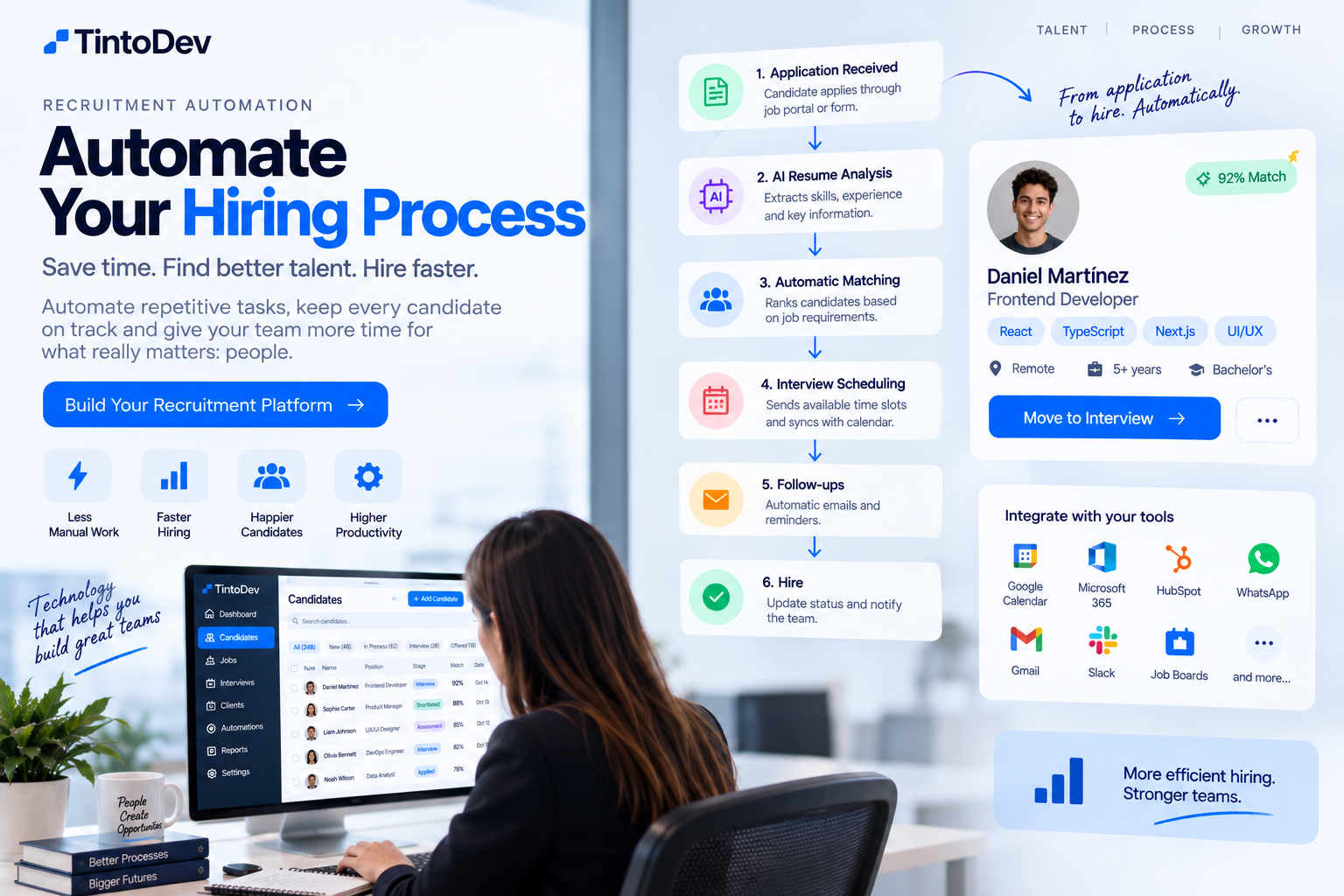
How to Automate a Recruitment Process Step by Step
Recruitment automation helps reduce manual tasks, improve candidate follow-up, and accelerate hiring processes without losing control over each stage.
Recruitment processes often involve many repetitive tasks.
Posting jobs, receiving applications, reviewing candidates, sending emails, requesting documents, coordinating interviews, updating statuses, and following up all require time and attention.
When a company manages only a few vacancies, these tasks may be handled manually.
The problem begins when the number of candidates, jobs, clients, and recruiters increases.
At that point, automation can help reduce operational work and improve control over the entire recruitment process.
Automating recruitment does not mean replacing recruiters.
It means using technology so the team can focus on higher-value activities such as evaluating candidates, conducting interviews, and working with clients.
What Does It Mean to Automate a Recruitment Process?
Recruitment automation means creating rules and workflows that automatically perform tasks when a specific event happens.
For example:
A candidate applies for a job.
The system can automatically:
- create the candidate profile;
- save the resume;
- register the application;
- send a confirmation email;
- classify the candidate;
- notify the recruiter;
- move the candidate into the first stage of the pipeline.
All of this can happen without someone manually entering every piece of information.
Which Parts of Recruitment Can Be Automated?
Many stages can be fully or partially automated.
For example:
- application intake;
- candidate creation;
- initial classification;
- resume analysis;
- emails;
- forms;
- interviews;
- reminders;
- document requests;
- status changes;
- candidate matching;
- reporting;
- follow-up.
The key is to automate repetitive tasks without removing decisions that require human judgment.
Step 1: Centralize Candidates and Jobs
Before automating, it is important to centralize information.
If candidates are spread across:
- Excel;
- email;
- forms;
- LinkedIn;
- WhatsApp;
- folders;
- different job boards;
automation becomes much more difficult.
Ideally, the company should work from an ATS or a dedicated recruitment platform.
Each candidate should have one profile.
Each vacancy should have its own process.
Step 2: Automate Application Intake
When a candidate applies, the system can automatically create their profile.
For example:
The candidate completes a form.
The system records:
- name;
- email;
- phone number;
- experience;
- skills;
- location;
- availability;
- resume.
The platform then creates the application connected to a specific vacancy.
This removes the need to copy information manually.
Step 3: Automate Resume Analysis
One of the most time-consuming tasks in recruitment is reviewing resumes.
A system can automatically process information such as:
- work experience;
- previous roles;
- skills;
- education;
- certifications;
- languages;
- location.
Artificial intelligence can also help extract and structure this information.
The recruiter still makes the final decision, but receives a more organized candidate profile.
Step 4: Automatically Classify Candidates
A recruitment platform can use rules to classify candidates.
For example:
A vacancy may require:
- more than three years of experience;
- React;
- TypeScript;
- English;
- immediate availability.
The system can identify which candidates meet more of these requirements.
Candidates can then be grouped into categories such as:
- high match;
- medium match;
- low match.
This helps recruiters prioritize their review.
Step 5: Automate Candidate Matching
Candidate matching compares candidate information with job requirements.
The system can analyze factors such as:
- skills;
- experience;
- location;
- salary expectations;
- availability;
- education;
- languages.
It can then generate a match score.
For example:
Candidate A – 92% match
Candidate B – 84% match
Candidate C – 71% match
The score should be used as a decision-support tool, not as the final hiring decision.
Step 6: Automate Emails and Communications
Recruitment involves a large amount of communication.
For example:
- application received;
- interview scheduled;
- document request;
- reminders;
- stage updates;
- rejection messages;
- job offers.
A recruitment platform can send these communications automatically.
This improves response speed and reduces administrative work.
Step 7: Automate Interview Scheduling
Interview coordination can also be automated.
For example:
- candidate moves to the interview stage;
- the system sends a scheduling link;
- the candidate selects a time;
- the calendar is updated;
- the interviewer receives an invitation;
- the candidate receives confirmation;
- a reminder is sent before the interview.
This eliminates long email chains.
Step 8: Automate Status Changes
Candidates usually move through several stages.
For example:
- applied;
- screening;
- interview;
- assessment;
- client review;
- offer;
- hired.
Certain actions can automatically update the candidate's status.
For example:
If the interview is completed, the system can move the candidate to assessment.
If the client approves the candidate, the profile can move to finalist.
Step 9: Automate Document Requests
At certain stages, candidates may need to submit documents.
The platform can automatically request:
- identification documents;
- certificates;
- references;
- licenses;
- background checks;
- work permits.
It can also generate alerts when documents are missing.
Step 10: Automate Reminders
Automated reminders can be used for:
- interviews;
- documents;
- tasks;
- follow-ups;
- offers;
- client feedback.
This reduces the chance that important actions are forgotten.
Automation for Recruiters
Recruiters can also receive automated tasks.
For example:
When a candidate enters a specific stage, the system can:
- create a task;
- assign a recruiter;
- send a notification;
- define a deadline.
This helps keep the process moving.
Automation for Clients
Clients can also receive automated updates.
For example:
When a candidate is ready for review, the system can:
- generate a candidate profile;
- create a summary;
- send an email;
- record the activity.
This reduces manual communication.
Form Automation
Recruitment forms can trigger workflows.
For example:
A candidate completes a pre-screening form.
The system can:
- update the candidate profile;
- save the responses;
- evaluate criteria;
- change the candidate status;
- notify the recruiter.
This turns forms into an active part of the recruitment workflow.
Recruitment Automation With Artificial Intelligence
AI can add additional capabilities such as:
- resume analysis;
- candidate classification;
- matching;
- candidate summaries;
- interview question generation;
- candidate recommendations;
- interview summaries.
This can automate tasks that previously required significant manual review.
Automate Without Losing Human Control
Not every recruitment decision should be automated.
Tasks such as:
- evaluating culture fit;
- interpreting experience;
- negotiating conditions;
- interviewing candidates;
- making hiring decisions;
still require human judgment.
Automation should support the recruitment team, not replace it.
Example of an Automated Recruitment Workflow
A complete process could work like this:
Step 1
Candidate applies.
Step 2
The system creates the candidate profile.
Step 3
The resume is analyzed.
Step 4
A match score is calculated.
Step 5
The recruiter receives an alert.
Step 6
The candidate moves to interview.
Step 7
The system schedules the interview.
Step 8
Feedback is recorded.
Step 9
The profile is sent to the client.
Step 10
The client approves the candidate.
Step 11
The candidate receives an offer.
Step 12
The process is marked as hired.
Many of these actions can happen automatically.
What Tools Can Be Integrated?
A recruitment platform can connect with:
- ATS;
- CRM;
- HubSpot;
- Google Calendar;
- Microsoft 365;
- forms;
- WhatsApp;
- email;
- job boards;
- artificial intelligence tools;
- external APIs.
Integrations make it possible to build more complete workflows.
Benefits of Recruitment Automation
Some of the main benefits include:
Less Manual Work
Recruiters spend less time on repetitive administrative tasks.
Faster Processes
Candidates move through the recruitment pipeline more quickly.
Better Follow-Up
Every action can be tracked.
Fewer Errors
Automation reduces dependency on manual data entry.
Better Candidate Experience
Candidates receive faster responses and more consistent updates.
Higher Recruiter Productivity
Recruiters can manage more vacancies and candidates.
Better Visibility
Managers can review KPIs and process performance.
Recruitment Automation KPIs
Some useful indicators include:
- time to hire;
- time per stage;
- candidates per recruiter;
- active vacancies;
- conversion rate;
- candidate source;
- response time;
- placements.
These indicators help companies measure the impact of automation.
When Should a Recruitment Process Be Automated?
Some common signs include:
- too many emails;
- excessive spreadsheet usage;
- recruiters performing repetitive tasks;
- candidates without proper follow-up;
- interviews that are difficult to coordinate;
- documents spread across different tools;
- slow recruitment processes;
- limited traceability.
When these problems become frequent, automation can have a significant impact.
Start With an MVP
It is not necessary to automate everything from day one.
A first version can include:
- candidates;
- jobs;
- recruitment pipeline;
- emails;
- tasks;
- interviews.
Later, additional functionality can be added:
- matching;
- AI;
- forms;
- CRM;
- integrations;
- advanced automation.
Recruitment Automation With TintoDev
At TintoDev, we develop custom platforms for recruitment and staffing companies.
A solution can include:
- ATS;
- CRM;
- candidate management;
- job management;
- recruitment pipelines;
- custom forms;
- candidate matching;
- artificial intelligence;
- interviews;
- automation;
- reports;
- integrations.
The platform can be adapted to the specific workflow of each company.
Conclusion
Recruitment automation helps reduce repetitive tasks and organize the entire hiring process more effectively.
From candidate intake to interviews, document requests, communication, and follow-up, many tasks can be automated.
The goal is not to automate everything.
The goal is to automate repetitive work so recruiters and managers can focus on decisions that require human experience and judgment.
Want to apply this in your business?
Let’s talk. We can guide you with no cost or commitment.