
How to Integrate ChatGPT into Business Processes
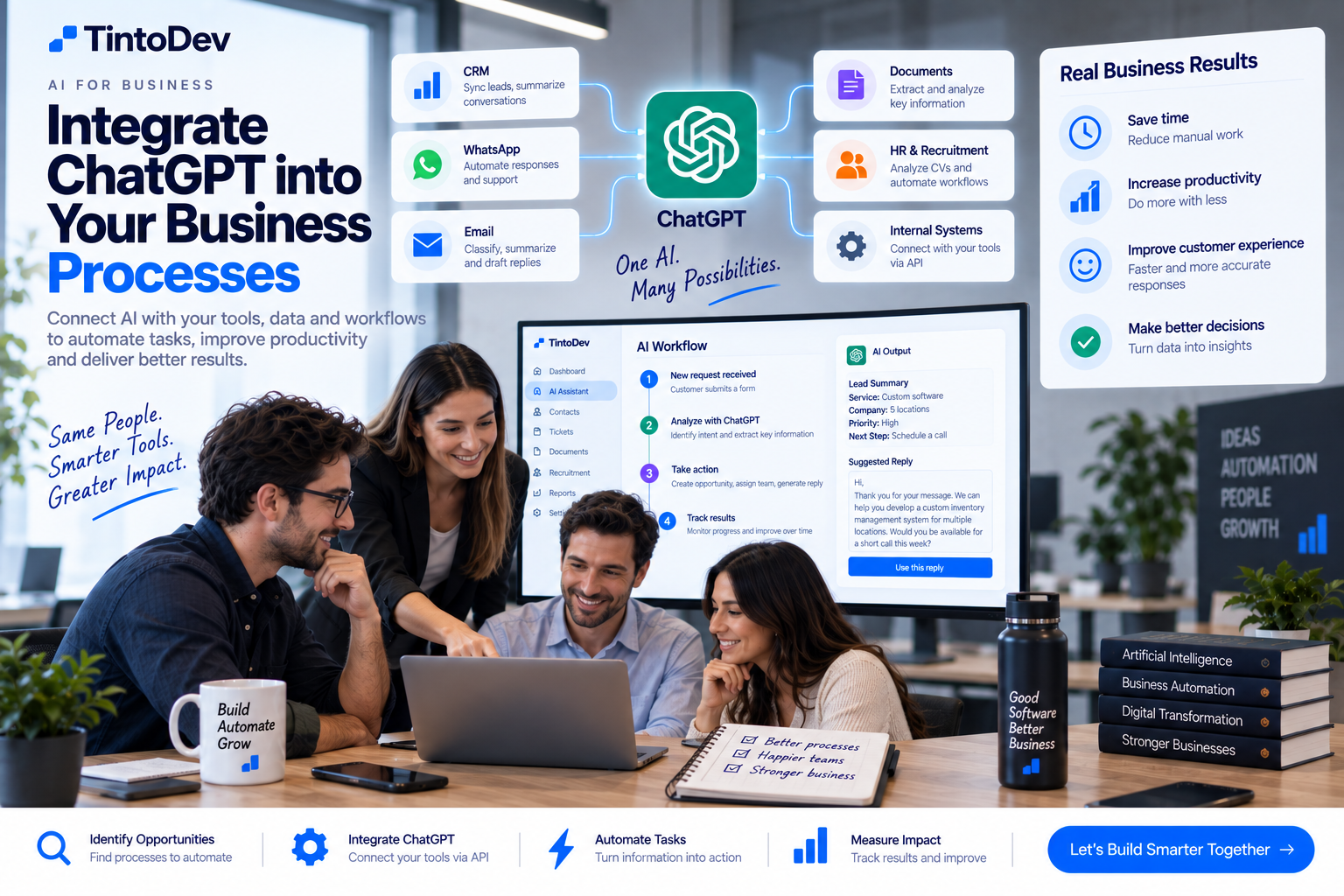
Integrating ChatGPT into business processes can help automate customer service, information analysis, responses, internal support, and repetitive administrative tasks.
Generative artificial intelligence has changed the way businesses work with information.
Tools such as ChatGPT can help write, summarize, analyze, classify, and respond to content within seconds.
However, the real business value does not come only from employees manually opening ChatGPT and asking questions.
The biggest impact appears when artificial intelligence is integrated directly into a company's systems and workflows.
For example, AI can connect with:
- CRM platforms;
- online forms;
- email;
- WhatsApp;
- databases;
- internal software;
- ticketing systems;
- recruitment platforms;
- company documentation;
- APIs.
This allows artificial intelligence to become an active part of business operations.
What Does It Mean to Integrate ChatGPT into a Business?
Integrating ChatGPT means connecting artificial intelligence capabilities with a company's tools, data, and workflows.
Instead of using AI only through manual conversations, a business system can automatically send information for analysis and then use the result to trigger another action.
For example:
A potential customer completes a form.
The AI analyzes the message.
It identifies which service the person needs.
It generates a summary.
The system creates an opportunity inside the CRM.
A response draft is prepared for the sales team.
All of this can happen within a single automated workflow.
ChatGPT as Part of Business Software
ChatGPT does not need to operate as a separate application.
Artificial intelligence can be embedded directly into existing business software.
For example, a CRM could include a button called:
Generate Summary
The system sends the conversation context to the AI.
The AI generates a summary.
The result is saved directly inside the customer profile.
From the user's perspective, everything happens inside the CRM.
Integrating AI Through an API
One of the most common methods for integrating artificial intelligence into business software is through an API.
An API allows one system to send information to another system and receive a response.
A basic workflow may look like this:
- the user performs an action;
- the software prepares the necessary information;
- a request is sent to the AI service;
- the model processes the information;
- a response is returned;
- the business system uses the result.
This makes it possible to develop custom AI features.
Integrating ChatGPT with a CRM
A CRM is one of the business systems where AI can create significant value.
AI can help:
- summarize conversations;
- draft follow-up messages;
- classify leads;
- identify customer intent;
- suggest next actions;
- analyze emails;
- generate sales notes.
For example:
A salesperson may have a customer conversation containing dozens of messages.
Instead of reading the entire conversation again, the system can generate a summary containing:
- primary requirement;
- estimated budget;
- urgency;
- requested service;
- next steps.
This can save significant time.
Automatic Lead Classification
AI can also help businesses determine what type of lead they have received.
For example, imagine a potential customer writes:
We need a system to manage inventory across five locations.
The AI could classify this as:
- sales opportunity;
- custom software;
- inventory management;
- multi-location company.
The business system can then use this information to route the inquiry to the correct person.
Generating Sales Responses
Artificial intelligence can help sales teams prepare response drafts.
For example:
A potential customer requests information about a service.
The system sends the conversation context to the AI and generates a suggested response.
The salesperson can then:
- review it;
- modify it;
- approve it;
- send it.
This saves time while maintaining human control.
ChatGPT for Customer Service
AI can also help support teams answer customer questions.
The system can analyze a question and search relevant company documentation.
For example:
A customer asks how to configure a particular feature.
The AI can use a knowledge base to prepare an answer.
If the system cannot confidently resolve the issue, the request can be escalated to a human agent.
ChatGPT and WhatsApp Integration
Businesses can also connect AI with WhatsApp.
A workflow may look like this:
- customer sends a message;
- the platform receives it;
- AI identifies the intent;
- the request is classified;
- a response or recommendation is generated;
- the request is assigned;
- the conversation is recorded.
This can support use cases such as:
- customer service;
- sales;
- technical support;
- appointment management;
- recruitment.
ChatGPT for Email Automation
Email creates a large amount of administrative work.
Artificial intelligence can help:
- classify emails;
- identify priority;
- summarize long email threads;
- extract information;
- create tasks;
- generate response drafts;
- route emails to the correct department.
For example, a company receiving hundreds of emails each day could automatically classify them into:
- sales;
- customer support;
- billing;
- suppliers;
- human resources.
This can dramatically reduce manual sorting.
Using ChatGPT to Analyze Documents
AI can also help businesses process documents.
Examples include:
- contracts;
- invoices;
- resumes;
- forms;
- reports;
- PDF files.
The system can extract information such as:
- names;
- dates;
- amounts;
- clauses;
- job titles;
- specific data points.
The extracted information can then be stored inside a database or another business system.
ChatGPT for Recruitment
Recruitment companies can use AI to:
- summarize resumes;
- compare candidates;
- generate interview questions;
- analyze job descriptions;
- create candidate summaries;
- draft candidate communications.
For example:
A company receives 100 resumes.
AI can extract information such as:
- experience;
- skills;
- education;
- location;
- languages.
An ATS can then use this structured information for search and candidate matching.
ChatGPT for Human Resources
Human resources departments can also use artificial intelligence for:
- document generation;
- onboarding;
- internal questions;
- policies;
- training;
- information retrieval.
An internal AI assistant can help employees find answers without repeatedly contacting HR.
Internal Business AI Assistants
A company can create an assistant connected to its own information.
For example, an employee asks:
What is the process for requesting annual leave?
The assistant searches internal documentation and provides the relevant information.
It can also answer questions about:
- processes;
- manuals;
- policies;
- procedures;
- products;
- internal systems.
This can reduce repetitive internal questions.
ChatGPT for Meeting Analysis
After a meeting, AI can generate:
- summaries;
- decisions;
- action items;
- owners;
- deadlines.
These tasks can then be sent automatically to a project management or internal operations platform.
Automating Meeting Minutes
A workflow could operate like this:
- meeting ends;
- transcription is processed;
- AI creates a summary;
- action items are identified;
- owners are assigned;
- information is stored.
This can save significant administrative time.
ChatGPT for Marketing
Marketing teams can also benefit from AI.
For example:
- content ideas;
- draft content;
- campaign analysis;
- comment classification;
- summaries;
- internal research.
However, AI-generated content should normally be reviewed before publication.
ChatGPT for Technical Support
AI can help understand technical support requests.
For example:
A user reports:
I cannot log in after changing my password.
The system can:
- classify the issue;
- search technical documentation;
- suggest troubleshooting steps;
- assign the ticket.
This can improve the initial response time.
Integrating ChatGPT with a Knowledge Base
One of the most useful enterprise implementations is connecting AI with company documentation.
The system can search relevant information before preparing an answer.
Sources can include:
- manuals;
- policies;
- technical documentation;
- FAQs;
- contracts;
- procedures.
This can make responses more relevant to the company's actual processes.
Reducing AI Hallucinations
One of the major risks of generative AI is that models can produce incorrect information.
For this reason, critical business processes should not give AI unlimited freedom.
Good practices may include:
- limiting available information sources;
- validating outputs;
- using trusted company documentation;
- defining clear business rules;
- requiring human approval where necessary.
Human in the Loop
Many AI integrations should include human review.
For example:
The AI generates a sales email.
The salesperson reviews it.
The salesperson approves and sends it.
This approach combines AI speed with human oversight.
What Processes Should Not Be Fully Automated?
Some decisions may require human review.
Examples include:
- hiring decisions;
- legal decisions;
- medical decisions;
- financial approvals;
- complex negotiations.
AI can assist with information and analysis, but it should not necessarily make the final decision.
Data Security
Before integrating AI, companies should define:
- what information can be processed;
- which information is sensitive;
- who can access the functionality;
- where data is stored;
- which provider is being used.
Not every workflow needs to send complete business data.
In some cases, information should be minimized or anonymized.
AI Integration Costs
The cost of AI integration depends on factors such as:
- request volume;
- amount of text processed;
- selected model;
- number of users;
- number of automated workflows.
Usage should therefore be monitored.
Managing Token Usage
AI requests consume computational resources.
A well-designed integration can control costs by:
- sending only relevant information;
- summarizing long histories;
- avoiding unnecessarily large context windows;
- selecting the appropriate model for each task.
More expensive or powerful models are not always necessary.
Basic AI Integration Architecture
A simple architecture may look like this:
User
↓
Business Application
↓
Backend
↓
AI API
↓
Response
↓
Database / Business Workflow
The backend controls what information is sent and how the response is used.
Do Not Expose API Credentials in the Frontend
API credentials should not normally be exposed directly inside a browser or client application.
Requests should generally pass through a backend.
This allows the company to control:
- authentication;
- permissions;
- usage;
- logs;
- errors;
- limits.
Log AI Interactions
It can also be useful to record information about AI usage.
For example:
- user;
- function used;
- date;
- model;
- result;
- usage.
This provides better auditing and helps understand how the feature is being used.
Measure Results
Before implementing AI, define what the company wants to improve.
For example:
- response time;
- hours saved;
- productivity;
- error reduction;
- lead response rates.
Then compare the results after implementation.
Example: Sales AI Integration
A complete sales workflow could look like this:
Step 1
Customer submits a form.
Step 2
AI analyzes the inquiry.
Step 3
The system classifies the requested service.
Step 4
AI generates a summary.
Step 5
The CRM creates an opportunity.
Step 6
The salesperson receives an alert.
Step 7
AI generates a response draft.
Step 8
The salesperson reviews and sends it.
Example: Customer Support Integration
Another workflow could be:
Step 1
A customer creates a support ticket.
Step 2
AI identifies the problem.
Step 3
The system searches company documentation.
Step 4
AI suggests a solution.
Step 5
If the issue cannot be resolved, the ticket is escalated.
Step 6
The support agent receives a summary.
Start with an MVP
Businesses do not need to automate everything immediately.
A good strategy is to start with one use case.
For example:
- summarize emails;
- classify leads;
- analyze documents;
- generate response drafts.
Once the value is proven, additional workflows can be added.
Benefits of Integrating ChatGPT
Some potential benefits include:
- less manual work;
- faster responses;
- better organization;
- automated analysis;
- better support for employees;
- process automation;
- increased productivity.
The value depends on selecting the right use case.
ChatGPT + Custom Software
One of the strongest ways to use AI in business is by integrating it directly into custom software.
This allows artificial intelligence to become part of the company's normal workflow.
Examples include:
- AI-powered CRM;
- ATS with AI;
- intelligent ticketing systems;
- healthcare platforms;
- ERP software;
- internal business systems.
The AI is not simply a chatbot.
It becomes a feature within the software.
AI Integrations with TintoDev
At TintoDev, we develop custom software and artificial intelligence integrations for businesses.
A solution can connect AI with:
- CRM;
- WhatsApp;
- email;
- forms;
- databases;
- ATS;
- internal software;
- APIs;
- dashboards.
The integration can be designed around the company's real workflows and operational needs.
Conclusion
Integrating ChatGPT into a business can create far more value than using it only as a standalone manual tool.
When AI connects with CRM platforms, email, WhatsApp, forms, documents, and internal systems, it can become an active part of business operations.
The key is to start with specific use cases.
Automate repetitive work.
Maintain human oversight.
Measure results.
And build the integration with security and scalability in mind.
Want to apply this in your business?
Let’s talk. We can guide you with no cost or commitment.